Lyrics and arrangements.
Import lyrics from text; organize verses and choruses with color groups, arrangements and repeats. Search by title or by the text on the slides.
KeruxPresentations for churches
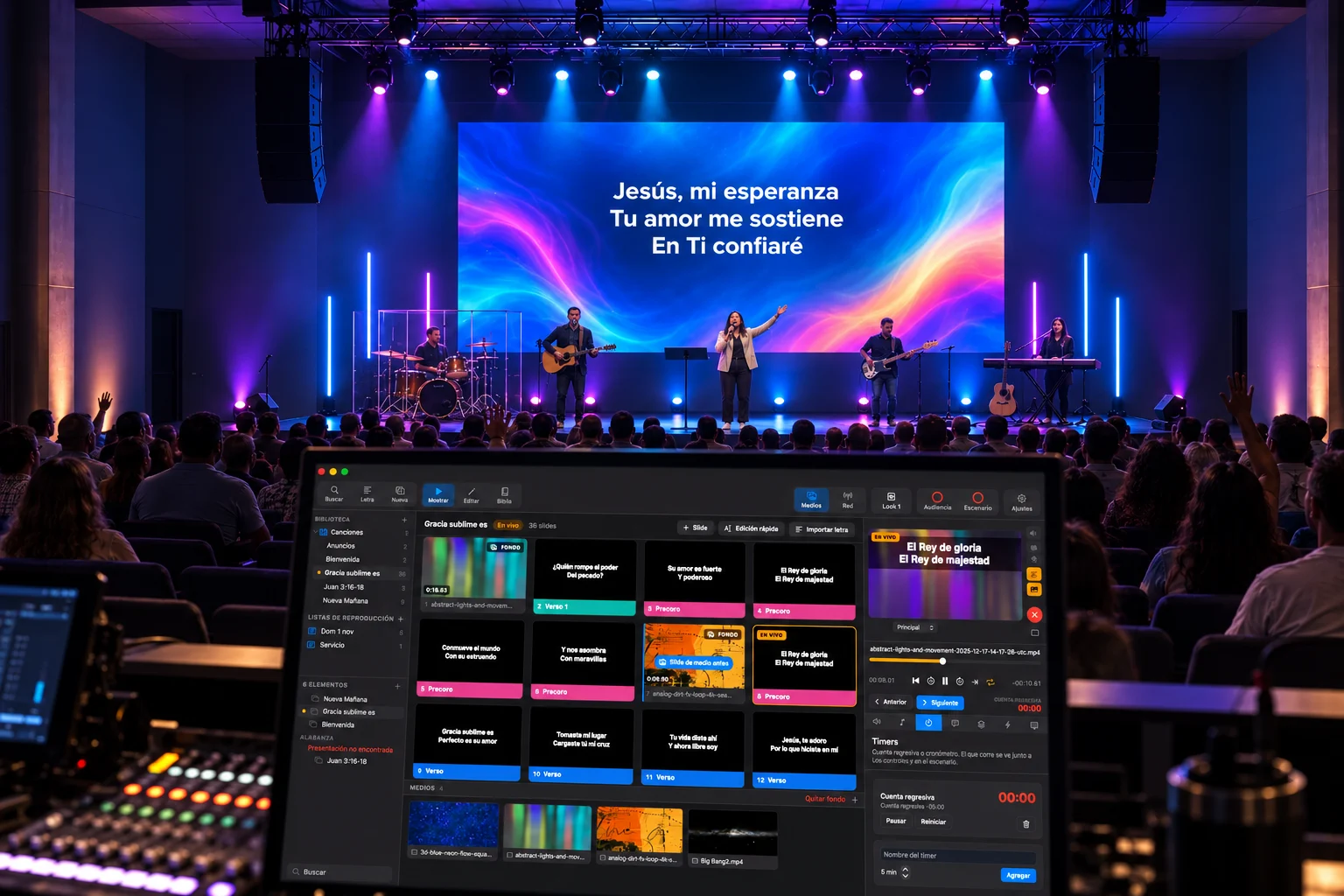
Lyrics, Bible and video in one Mac app. You focus on the service; Kerux runs the presentation.
15 days free
Set up your songs and get to know Kerux before choosing your annual license.
Compatibility
Check the system requirements and hardware guide to plan your installation.
Prepare presentations, design every screen and control what goes live from the booth or from a mobile device.
Import lyrics from text; organize verses and choruses with color groups, arrangements and repeats. Search by title or by the text on the slides.
Your word is a lamp to my feet.Psalm 119:105
Search api.bible or use local Bibles in XML. Available translations depend on the provider and its permissions.
Save presentations locally, group them in playlists with folders and headers, add notes and reuse designs with templates.
Edit text, fonts, colors and transitions. Move, scale and rotate layers on the canvas, fit media to the screen, and undo or redo changes.
Use images and videos as a background or a layer. Control volume, looping, fades and stopping tracks; advance when a video or audio clip ends.
Send each output to its own screen and choose which layers appear on each one. The stage display can show the next slide, notes, a clock, timers and messages; you can also open it on the web in read-only mode.
Control layers, blackout, timers, messages, props, Looks and macros. Combine several actions into one sequence.
Schedule advances by time or when a video or audio clip ends; run macros when a slide comes up and loop announcements from the start whenever you need to.
Open the remote from a phone or tablet with a link or QR code on your local network. See previews, run slides, playlists and production, or connect tools through the HTTP/WebSocket API. Set up OBS overlays for lyrics, passages, slides and countdowns, as a lower third or full screen.
Receive MIDI actions, send lighting over sACN or Art-Net, and search or control music with Spotify Premium.
Import content from FreeShow, OpenLyrics/OpenLP, OpenSong and ProPresenter 4–7. Review songs and arrangements before adding them to your library.

Kerux Media
39 families of motion backgrounds, countdowns and stills in 4K and HD. Download them from Kerux or the web.
Kerux is the presentation app of the AdminFiel family, focused on what happens on your church's screens.
A connection between the AdminFiel order of service and Kerux is planned for a later stage. For now, Kerux manages its presentations and playlists locally.
To save an early-adopter spot, just register your church in AdminFiel with an email and phone number; no paid plan required.
Discover AdminFielThe same full edition. Choose how many computers your church needs.
Launch price: 100% off the first year today, for the next 100 licenses. The discount steps down to 50%, available until December 31, 2027. Prices in US dollars (USD).
1 computer
Launch · 100% off
$119Freefor the first year
For the team that presents every Sunday.
3 computers
Launch · 100% off
$239Freefor the first year
Booth, prep and backup in one package.
10 computers
Launch · 100% off
$599Freefor the first year
For multiple auditoriums and ministries.
The first year is free, no card required. 100 free licenses are left; when they run out, the 90% tier opens. For the second year you renew at the current price.
Early adopters
The first 400 licenses get a stepped discount on their first year. When a tier runs out, the next one opens; after that, the launch price applies.
100 of 100 licenses left at 100% off
No limits on your volunteers. Packages count active computers, not people.
Your church's library. Your presentations are saved locally. You don't need a paid AdminFiel subscription to buy Kerux.
We want to walk alongside new, small and missional churches. We're preparing Kerux Community: donated annual licenses, subject to availability.
Book a demoYes. The launch includes a 15-day free trial so you can get to know Kerux before buying an annual license. The installers are still being prepared; the download buttons will announce when they're available.
Choose your plan under Licenses, sign in with your AdminFiel account and pay by card on Stripe's secure page. While free licenses last, you just create your account or sign in and the license is assigned to your church, no card required.
You don't need a paid AdminFiel plan. For early-adopter discounts you register your church in AdminFiel with an email and phone number, so we can verify one license per church.
The integration is planned for a later stage. For now, you prepare and manage your playlists directly in Kerux.
The current version is built for Mac with macOS 13 or later. Windows is planned for a later stage and has no announced date.
Presentations and local media play from your Mac. External services, such as looking up passages through an online provider, need a connection. The license validation policy will be confirmed at launch.
It includes 12 months of use, updates and support for the number of computers in your package. It renews automatically every year and you can cancel anytime. You activate each Mac by signing in to Kerux with your account.
No. The early-adopter discount applies to the first year only. From the second year you renew at the current price: the launch price (50% off) until December 31, 2027, and the regular price after that. Discounts cannot be combined.
The first 100 licenses are 100% off, the next 90 are 90% off, then 80 at 80%, 70 at 70% and 60 at 60%. There is a single counter for all three plans, and each tier opens when the previous one runs out. After that, the launch price applies.
Your next service
can start here.